
Lazy Column
Introduction
Imagine you're scrolling through your social media feed. You see posts, pictures, and comments as you scroll down. But have you ever wondered how your phone manages to show all that content without getting slow or running out of memory? That's where LazyColumn comes in!
LazyColumn is like a smart list that only shows you what you can actually see on your screen. Think of it as a window into a long list of items - you only see what's in the window, and as you move the window (by scrolling), it shows you different parts of the list. This is super important because it helps your app run smoothly, even when you have hundreds or thousands of items to display.
Quick Reference: LazyColumn Features
| Feature | What It Does | When to Use It |
|---|---|---|
| Memory Efficiency | Only creates visible items | For long lists of data |
| Item Recycling | Reuses UI components | For smooth scrolling |
| Built-in Scrolling | Handles scroll behavior | For scrollable lists |
| Easy Implementation | Simple API compared to RecyclerView | For modern Android apps |
Basic LazyColumn Concepts
When to Use LazyColumn
- Long lists of items (social media feeds)
- Dynamic content (search results)
- Smooth scrolling needed (chat apps)
- Complex items (cards with images)
When to Use Regular Column
- Short lists (settings menu)
- Static content (forms)
- No scrolling needed
- Simple layouts
How LazyColumn Works
- Data Management:
- Stores all item data in memory
- Only creates UI for visible items
- Recycling Process:
- Moves off-screen items to recycling pool
- Reuses components for new items
- Updates content with new data
Real-World Example: Contact List
Let's look at a practical example - a contact list app. This is something you might actually build!
// Data class for our list items
data class Contact(
    val name: String,
    val email: String
)

@Composable
fun LazyColumnExample(modifier: Modifier = Modifier.padding(top = 50.dp)) {
    val contacts = listOf(
        Contact("John Doe", "john@example.com"),
        Contact("Jane Smith", "jane@example.com"),
        Contact("Bob Johnson", "bob@example.com"),
        Contact("Alice Brown", "alice@example.com"),
        Contact("Charlie Wilson", "charlie@example.com")
        ...more names here
    )

    LazyColumn(
        modifier = modifier
            .fillMaxWidth()
            .padding(16.dp),
        verticalArrangement = Arrangement.spacedBy(8.dp)
    ) {
        items(contacts) { contact ->
            ContactCard(contact)
        }
    }
}

@Composable
fun ContactCard(contact: Contact) {
    Card(
        modifier = Modifier.fillMaxWidth(),
        elevation = CardDefaults.cardElevation(defaultElevation = 4.dp)
    ) {
        Column(
            modifier = Modifier
                .fillMaxWidth()
                .padding(16.dp),
            verticalArrangement = Arrangement.spacedBy(4.dp)
        ) {
            Text(
                text = contact.name,
                style = MaterialTheme.typography.titleMedium
            )
            Text(
                text = contact.email,
                style = MaterialTheme.typography.bodyMedium,
                color = MaterialTheme.colorScheme.onSurfaceVariant
            )
        }
    }
}
What This Example Is Doing
A Contact data class holds name and email. LazyColumnExample builds a list of contacts and passes it to LazyColumn. Instead of putting every contact on screen at once, items(contacts) { contact -> ... } creates only the visible rows (and a few off-screen for smooth scrolling); as you scroll, items are composed when they enter view and recycled when they leave. Each item is a ContactCard—a Card with the contact’s name and email in a column. So you get a scrollable contact list that stays efficient even with many entries.
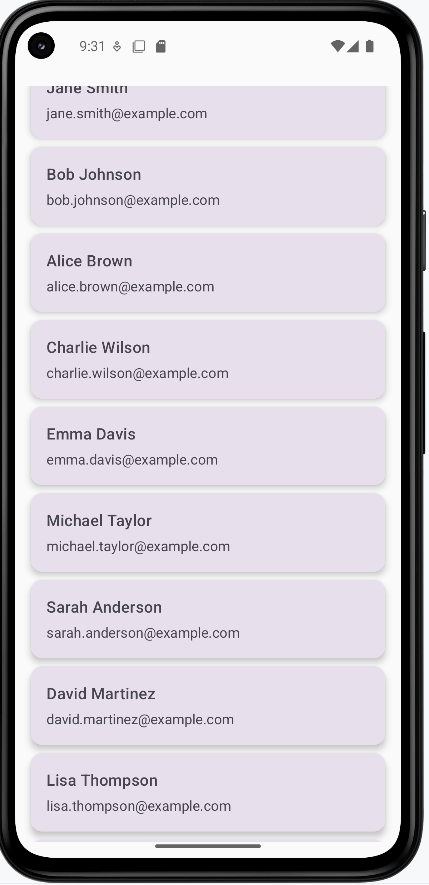
How this example renders
The screenshot shows the contact list on screen: a vertical list of cards, each with a name (e.g., “John Doe”) and email below it. You can scroll up and down to see more contacts; only the visible cards are actually composed, so the list stays smooth even with many entries. The code above is a snippet; the full project is on my GitHub page—open the chapter8 lazycolumn.kt file to run it.
Tips for Success
- Use LazyColumn for long, scrollable lists
- Keep item layouts simple and efficient
- Use proper spacing between items
- Consider using Card components for list items
- Test with different screen sizes
Common Mistakes to Avoid
- Using LazyColumn for short, static lists
- Creating complex layouts for each item
- Not handling empty states
- Forgetting to add proper spacing
- Not considering performance with large datasets
Best Practices
- Use appropriate item spacing
- Implement proper error handling
- Add loading states for data
- Consider accessibility
- Test scrolling performance