
CPS251
Android Development
Sharing State Between Screens
Introduction
In real apps, you often need to share data between different screens. Jetpack Compose makes this possible by using shared ViewModels or other state holders. This lesson shows you how to share state between screens in a way that's simple and reliable.
When to Share State
- When two or more screens need to access or update the same data
- When you want to keep user progress or selections as they move through your app
- When you want to avoid passing lots of arguments between screens
Main Concepts
- Shared ViewModel: Use a ViewModel that is scoped to a navigation graph or activity so multiple screens can access it.
- Navigation arguments: Pass data directly when navigating, for simple cases.
- Single source of truth: Keep your shared data in one place to avoid bugs and confusion.
Practical Example
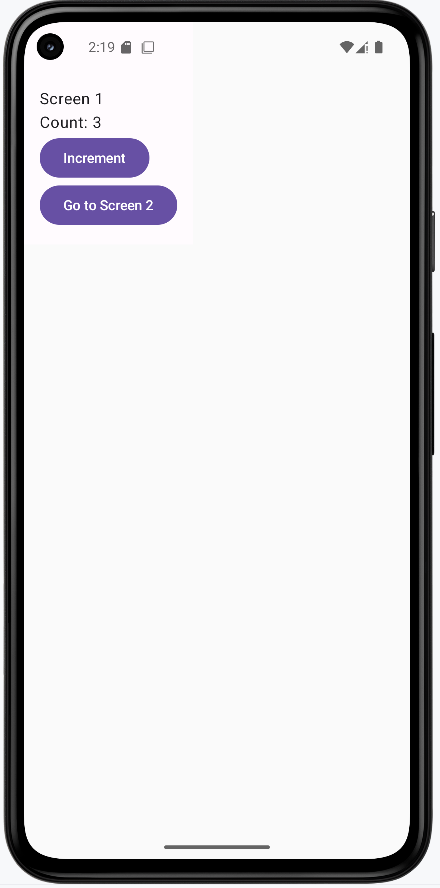
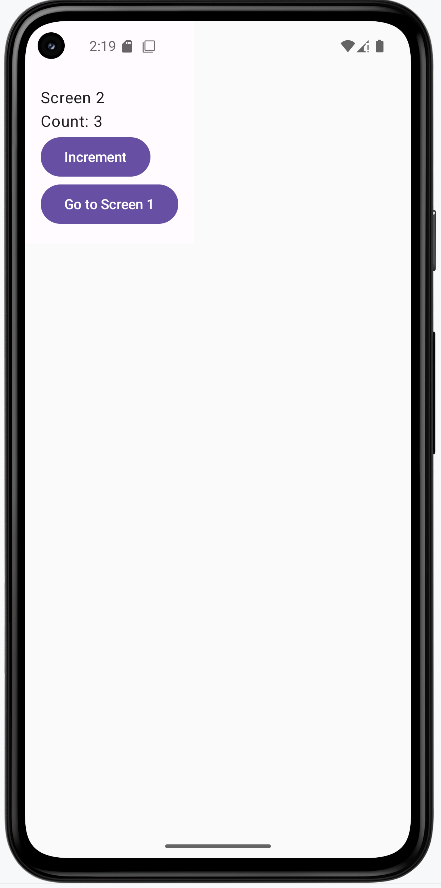
Let's look at a practical example that demonstrates sharing state between screens using a ViewModel. We'll create a counter app with two screens that share the same count:
The Shared ViewModel
// MainViewModel.kt
import androidx.lifecycle.ViewModel
import androidx.compose.runtime.getValue
import androidx.compose.runtime.mutableStateOf
import androidx.compose.runtime.setValue

class MainViewModel : ViewModel() {
    // The state is shared between screens
    var count by mutableStateOf(0)
        private set

    fun increment() { count++ }
}
Setting Up Navigation (on Main Activity)
// MainActivity.kt
import androidx.compose.runtime.Composable
import androidx.navigation.compose.NavHost
import androidx.navigation.compose.composable
import androidx.navigation.compose.rememberNavController

@Composable
fun MainScreen() {
    val navController = rememberNavController()

    NavHost(navController = navController, startDestination = "screen1") {
        composable("screen1") {
            CounterScreen1(navController)
        }
        composable("screen2") {
            CounterScreen2(navController)
        }
    }
}
The Two Screens (on Main Activity)
//MainActivity.kt
import androidx.compose.foundation.layout.Column
import androidx.compose.material3.Button
import androidx.compose.material3.Text
import androidx.compose.runtime.Composable
import androidx.lifecycle.viewmodel.compose.viewModel
import androidx.navigation.NavController

@Composable
fun CounterScreen1(
  navController: NavController,
  viewModel: MainViewModel = viewModel()
) {
  Column {
      Text("Screen 1")
      Text("Count: ${viewModel.count}")
      Button(onClick = { viewModel.increment() }) {
          Text("Increment")
      }
      Button(onClick = { navController.navigate("screen2") }) {
          Text("Go to Screen 2")
      }
  }
}

@Composable
fun CounterScreen2(
  navController: NavController,
  viewModel: MainViewModel = viewModel()
) {
  Column {
      Text("Screen 2")
      Text("Count: ${viewModel.count}")
      Button(onClick = { viewModel.increment() }) {
          Text("Increment")
      }
      Button(onClick = { navController.navigate("screen1") }) {
          Text("Go to Screen 1")
      }
  }
}
This example demonstrates several important concepts about sharing state:
- The state (count) is managed by a single ViewModel, making it the single source of truth
- Both screens share the same ViewModel instance, so they see the same count
- The count persists when navigating between screens
- Each screen can update the count, and all screens reflect the change
- The state survives configuration changes (like screen rotation)
How this example renders
Above is just a snippet of the code to view the full code, you need to go to my GitHub page and look at the chapter10 sharingScreens folder you will find the full code for the Main Acvitity and Main View Model files.
Tips for Success
- Use a shared ViewModel for data that needs to be accessed by multiple screens.
- Keep your shared state simple and focused.
- Document what data is shared and why.
Common Mistakes to Avoid
- Creating separate ViewModels for each screen when you need to share data.
- Passing too much data as navigation arguments (can get messy).
- Letting multiple places update the same data without coordination.
Best Practices
- Use a single source of truth for shared data.
- Scope your ViewModel to the navigation graph or activity, not just a single composable.
- Keep your shared ViewModel focused on just the data that needs to be shared.