
Android Studio Architecture
Think of Android like a delicious layer cake - each layer has its own special job, but they all work together to create something amazing! Just like how a cake needs a solid base, filling, and frosting, Android needs different layers to make your apps work smoothly.
In this lesson, we'll explore how Android is built from the ground up. You'll learn about each layer of the Android "cake" and how they work together to create the apps you use every day.
Quick Reference Table
| Layer | Description | What It Does |
|---|---|---|
| Applications | Top layer | Where your apps live and run |
| Application Framework | Services layer | Provides tools and services for apps |
| Libraries | Code libraries | Ready-to-use code for common tasks |
| Android Runtime | Runtime environment | Runs your app code |
| Hardware Abstraction | Hardware interface | Connects software to hardware |
| Linux Kernel | Bottom layer | Manages core system functions |
The Android Software Stack
Android is like a well-organized toolbox, with each layer having a specific job. Let's look at how these layers work together:
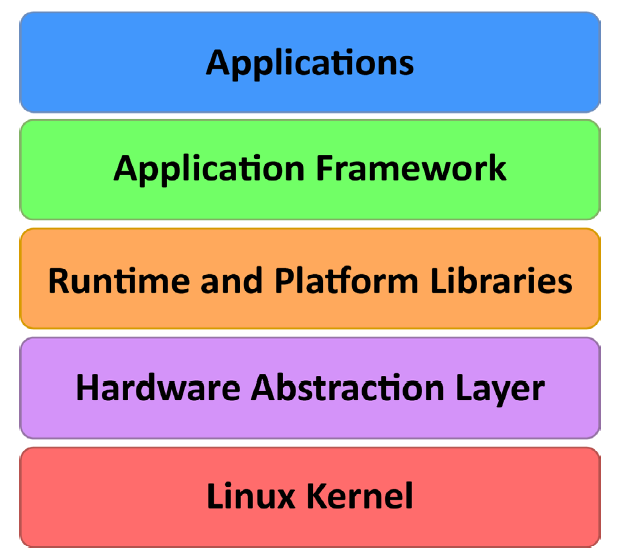
The Linux Kernel: The Foundation
What It Does
- Manages memory and system resources
- Handles multiple tasks running at the same time
- Controls hardware like the screen, camera, and speakers
- Manages power to keep your battery lasting longer
The Linux Kernel is like the foundation of a house - it's what everything else is built on. It handles the basic stuff that makes your phone work:
- Managing memory (like keeping track of what apps are using)
- Handling multiple tasks (like running your music app while checking email)
- Controlling hardware (like the screen, camera, and speakers)
- Managing power (like putting your phone to sleep when you're not using it)
Hardware Abstraction Layer: The Translator
What It Does
- Translates between your app and the phone's hardware
- Makes sure apps work on different types of phones
- Handles communication with sensors and cameras
- Ensures consistent behavior across devices
The Hardware Abstraction Layer (HAL) is like a translator between your app and the phone's hardware. It helps your app talk to things like:
- The camera
- The microphone
- The accelerometer (for detecting movement)
- Other sensors and hardware features
Android Runtime: The App Runner
What It Does
- Runs your Android apps efficiently
- Converts app code into a format your phone can understand
- Optimizes app performance and battery usage
- Manages app resources and memory
The Android Runtime (ART) is like a personal trainer for your apps - it helps them run faster and use less battery. Here's how it works:
- When you build your app, it's compiled into a special format called DEX
- When you install the app, ART converts it into a format your phone can understand
- This makes your apps run faster and use less battery
Android Libraries: The Toolbox
What It Does
- Provides ready-to-use code for common tasks
- Handles graphics, animations, and user interface
- Manages user input and touch events
- Connects to system services and features
Android Libraries are like a toolbox full of ready-to-use tools. Here are some of the most useful ones:
- android.app - The basic building blocks for your apps
- android.content - Helps apps share data with each other
- android.graphics - Tools for drawing and animations
- android.view - Building blocks for your app's interface
- android.widget - Ready-made buttons, text fields, and other UI elements
Application Framework: The Rule Book
What It Does
- Manages how apps start, run, and stop
- Handles notifications and alerts
- Manages app resources and settings
- Helps apps work together and share data
The Application Framework is like a rule book that helps apps work together. It includes:
- Activity Manager - Controls how apps start, stop, and switch between each other
- Content Providers - Lets apps share data (like contacts or photos)
- Resource Manager - Manages things like text, colors, and layouts
- Notifications Manager - Handles alerts and notifications
Applications: The User Interface
What It Does
- Provides the interface you see and use
- Handles user interactions and input
- Delivers specific features and functionality
- Creates the user experience
Applications are what you see and use every day - they're the top layer of the Android cake. This includes:
- Built-in apps (like Phone, Messages, and Camera)
- Apps you install from the Play Store
- Apps you create yourself
Tips for Success
- Start by understanding the basic layers and how they work together
- Focus on the Application Framework and Libraries when starting to develop
- Use the Android documentation to learn about available tools and features
- Practice building simple apps to understand how the layers interact
- Keep up with Android updates to learn about new features and improvements
Common Mistakes to Avoid
- Not understanding which layer to use for different tasks
- Trying to access hardware directly without using the proper APIs
- Ignoring the Application Framework's rules and guidelines
- Not considering how your app will work on different devices
- Forgetting to handle app lifecycle events properly
Best Practices
- Follow Android's design guidelines for consistency
- Use the provided libraries instead of creating your own solutions
- Test your app on different devices and Android versions
- Keep your app's code organized and maintainable
- Use the Application Framework's features instead of reinventing them