
Hoisting State Up
Introduction
"Hoisting state up" means moving data and logic to a common parent so that multiple composables can share and update the same information. In Jetpack Compose, this is a key pattern for building apps that are easy to understand and maintain. It helps keep your UI predictable and your code organized.
When to Hoist State Up
- When two or more composables need to read or change the same data
- When you want to keep your UI components reusable and independent
- When you want to separate your UI from your app's logic
Main Concepts
- Single Source of Truth: Keep the data in one place (usually a parent composable or ViewModel) and pass it down to children.
- Unidirectional Data Flow: Data flows down from parent to child, and events flow up from child to parent.
- Stateless Composables: UI components that don't manage their own state are easier to reuse and test.
Why Hoist State? A Before and After Example
Let's look at a counter example first without hoisting, and then see how hoisting makes the code more maintainable and follows best practices:
Without Hoisting (More Complex to Maintain)
// Each composable manages its own state
@Composable
fun CounterScreen() {
    Column(
        modifier = Modifier
            .padding(top = 50.dp)
            .padding(16.dp)
    ) {
        // Display has its own state
        var displayCount by remember { mutableStateOf(0) }
        Text("Count: $displayCount")

        // Button has its own state
        var buttonCount by remember { mutableStateOf(0) }
        Button(onClick = {
            buttonCount++
            displayCount = buttonCount  // We can sync them, but this gets messy
        }) {
            Text("Increment")
        }

        // If we add another button, we need to update both states
        Button(onClick = {
            buttonCount--
            displayCount = buttonCount  // Duplicate code
        }) {
            Text("Increment Again")
        }

        // If we add another display, we need to update it too
        Text("Another Count: $displayCount")
    }
}
- While we can keep the states in sync, it requires manual synchronization
- Each new component that needs the count requires additional state updates
- If we forget to update any state, the UI becomes inconsistent
- As the app grows, this approach becomes harder to maintain and more prone to bugs
- Components are tightly coupled because they need to know about each other's state
With Hoisting (Better Practice)
// Parent composable holds the state
@Composable
fun CounterParent() {
    var count by remember { mutableStateOf(0) }
    Column(
        modifier = Modifier
            .padding(top = 50.dp)
            .padding(16.dp)
    ) {
        CounterDisplay(count = count)
        CounterIncButton(onIncrement = { count++ })
        CounterDecButton(onDeIncrement = { count-- })
    }
}

/**
 * CounterDisplay is a stateless composable that shows the current count.
 * It receives the count as a parameter and simply displays it.
 * Being stateless makes it reusable and easier to test.
 */
@Composable
fun CounterDisplay(count: Int) {
    Text("Count: $count")
}

/**
 * CounterIncButton is a stateless composable that provides the increment functionality.
 * It receives a callback function (onIncrement) as a parameter.
 * When clicked, it triggers the callback to update the parent's state.
 */
@Composable
fun CounterIncButton(onIncrement: () -> Unit) {
    Button(onClick = onIncrement) {
        Text("Increment")
    }

}

/**
 * CounterDecButton is a stateless composable that provides the increment functionality.
 * It receives a callback function (onDeIncrement) as a parameter.
 * When clicked, it triggers the callback to update the parent's state.
 */
@Composable
fun CounterDecButton(onDeIncrement: () -> Unit){
    Button(onClick = onDeIncrement){
        Text("DeIncrement")
    }
}
- State is managed in one place (single source of truth)
- Adding new components is simple - just pass the state and callback
- Components are decoupled - they don't need to know about each other
- The code is more maintainable and less prone to bugs
- Components are reusable because they're stateless
With Hoisting Using a ViewModel
The same hoisting pattern works when the state lives in a ViewModel instead of in the parent composable. The idea is the same: one place owns the state (the ViewModel), and the UI just displays it and sends events (like button clicks) to update it. The big advantage is that the ViewModel survives configuration changes (like rotating the device), so the count is not lost when the screen is recreated.
// CounterViewModel.kt (or in the same file for a small example)
import androidx.lifecycle.ViewModel
import androidx.compose.runtime.mutableStateOf
import androidx.compose.runtime.getValue
import androidx.compose.runtime.setValue

class CounterViewModel : ViewModel() {
    private var _count = mutableStateOf(0)
    val count: Int
        get() = _count.value

    fun increment() {
        _count.value = _count.value + 1
    }

    fun decrement() {
        _count.value = _count.value - 1
    }
}
The parent composable no longer holds remember { mutableStateOf(0) }. Instead, it gets a ViewModel with viewModel() and passes the ViewModel's count and functions down to the same stateless children. The child composables (CounterDisplay, CounterIncButton, CounterDecButton) stay exactly the same—they still receive a value and callbacks; they don't care whether the state came from a parent composable or a ViewModel.
// Parent composable uses the ViewModel as the state owner
import androidx.lifecycle.viewmodel.compose.viewModel

@Composable
fun CounterParentWithViewModel() {
    val viewModel: CounterViewModel = viewModel()
    Column(
        modifier = Modifier
            .padding(top = 50.dp)
            .padding(16.dp)
    ) {
        CounterDisplay(count = viewModel.count)
        CounterIncButton(onIncrement = { viewModel.increment() })
        CounterDecButton(onDeIncrement = { viewModel.decrement() })
    }
}

// CounterDisplay, CounterIncButton, and CounterDecButton are unchanged—
// they still take count and callbacks; only the source of that data changed.- The ViewModel is the single source of truth; the UI only reads and sends events.
- The same stateless composables (
CounterDisplay,CounterIncButton,CounterDecButton) are reused—no changes needed. - The count survives screen rotation because the ViewModel is lifecycle-aware.
- This is still hoisting: state lives in one place (the ViewModel) and flows down; events flow up through function calls.
Note: While it's possible to keep states in sync without hoisting, hoisting is considered a best practice because it makes your code more maintainable, less prone to bugs, and easier to extend. It's especially important as your app grows in complexity.
Note: In the first hoisting example (parent composable only), we did not use a ViewModel, so the state will not persist on rotation of the device. The ViewModel version above does the same hoisting pattern and keeps the state across rotation.
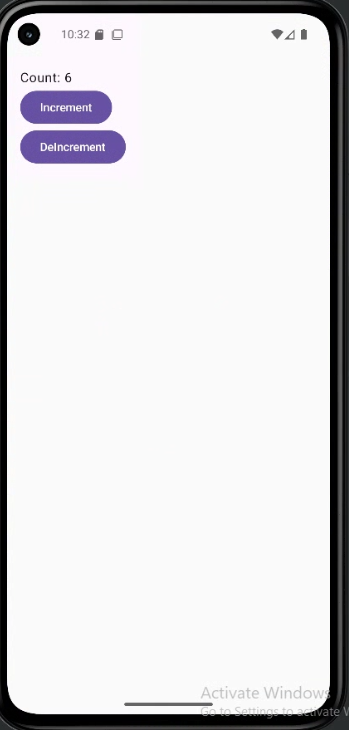
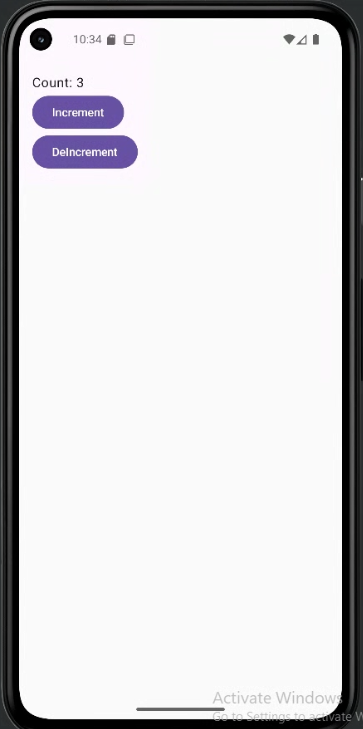
How this example renders (both examples above output the same result)
Above is just a snippet of the code to view the full code, you need to go to my GitHub page and look at the chapter10 hoisting.kt file.
Tips for Success
- Keep state as high as necessary, but as low as possible.
- Make your UI components stateless whenever you can.
- Pass data and event handlers (like
onClick) down to children.
Common Mistakes to Avoid
- Letting multiple composables manage the same piece of state (can cause bugs and confusion).
- Making UI components manage their own state when they don't need to.
- Not passing event handlers down, which makes it hard for children to update state.
Best Practices
- Always keep a single source of truth for each piece of data.
- Use stateless composables for UI whenever possible.
- Document which composable owns the state and which are stateless.