
Stateless and Stateful Composables
Think of composables like building blocks for your app. Some blocks are simple and don't need to remember anything (stateless), while others need to keep track of information (stateful). We'll learn about both types and when to use them to build better, more organized apps!
Quick Reference
| Type | Description | Common Use |
|---|---|---|
| Stateless | Simple display components that don't remember anything | Displaying static content, reusable UI elements |
| Stateful | Smart components that remember and manage changing data | Interactive elements, forms, dynamic content |
When to Use Each Type
- Use Stateless Composables when:
- You just need to display information
- The component doesn't need to change on its own
- You want to make the component reusable
- You're creating simple UI elements
- Use Stateful Composables when:
- You need to remember information that changes
- The component needs to respond to user actions
- You need to manage complex interactions
- You're handling form inputs or user data
Common Options
| Option | What It Does | When to Use It |
|---|---|---|
| Parameters | Pass data to composables | When creating stateless components |
| remember | Store state in composables | When creating stateful components |
| mutableStateOf | Create changeable state | When state needs to update UI |
Practical Examples
Stateless Composable Example
This example shows a simple greeting card that just displays information. The GreetingCard Composable function creates a greeting card that dynamically shows the input name and a static welcome message. Each time this Composable is recomposed with a new name, it will display the updated name without any memory of the previous name.
@Composable
fun GreetingCard(name: String) {
    Column(
        modifier = Modifier.padding(16.dp),
        horizontalAlignment = Alignment.CenterHorizontally
    ) {
        Text(
            text = "Hello, $name!",
            style = TextStyle(fontSize = 24.sp)
        )
        Text(
            text = "Welcome to my app!",
            style = TextStyle(fontSize = 16.sp)
        )
    }
}
What This Example Is Doing
GreetingCard takes a name parameter and displays "Hello, name!" and "Welcome to my app!" in a centered column. It does not use remember or any state—it only shows what it is given. If the parent passes a different name, the composable recomposes and shows the new name. It has no memory of previous names; it is stateless.
Stateful Composable Example
This example demonstrates a counter that remembers and updates its value. Think of it like a scoreboard that needs to keep track of points!
@Composable
fun Counter() {
    // This is state - it remembers the count
    var count by remember { mutableStateOf(0) }

    Column(
        modifier = Modifier.padding(16.dp),
        horizontalAlignment = Alignment.CenterHorizontally
    ) {
        Text(
            text = "Count: $count",
            style = TextStyle(fontSize = 24.sp)
        )
        Button(onClick = { count++ }) {  //If count did not have by remember it would not know what the past number was
            Text("Add One")
        }
    }
}
What This Example Is Doing
Counter keeps count in state with remember { mutableStateOf(0) }. It shows the count and an "Add One" button; clicking the button runs count++. Without remember, count would be re-initialized on every recomposition and would never increase. Because it is stateful, the composable remembers the count across recompositions and the UI updates when the value changes.
Combining Both Types
This example shows how stateless and stateful composables can work together in a profile card app.
@Composable
fun ProfileInfo(name: String, age: String) {
    Column(
        modifier = Modifier.padding(16.dp),
        horizontalAlignment = Alignment.CenterHorizontally
    ) {
        Text(
            text = "Name: $name",
            style = TextStyle(fontSize = 24.sp)
        )
        Spacer(modifier = Modifier.height(8.dp))
        Text(
            text = "Age: $age",
            style = TextStyle(fontSize = 20.sp)
        )
    }
}

@Composable
fun EditableProfile() {
    var isEditing by remember { mutableStateOf(false) }
    var name by remember { mutableStateOf("John") }
    var age by remember { mutableStateOf("20") }

    Column(
        modifier = Modifier
            .fillMaxWidth()
            .padding(16.dp),
        horizontalAlignment = Alignment.CenterHorizontally
    ) {
        ProfileInfo(name = name, age = age)

        Spacer(modifier = Modifier.height(16.dp))

        Button(onClick = { isEditing = !isEditing }) {
            Text(if (isEditing) "Save" else "Edit")
        }

        if (isEditing) {
            Spacer(modifier = Modifier.height(16.dp))

            OutlinedTextField(
                value = name,
                onValueChange = { name = it },
                label = { Text("Name") },
                modifier = Modifier.fillMaxWidth()
            )

            Spacer(modifier = Modifier.height(8.dp))

            OutlinedTextField(
                value = age,
                onValueChange = { age = it },
                label = { Text("Age") },
                modifier = Modifier.fillMaxWidth()
            )
        }
    }
}
What This Example Is Doing
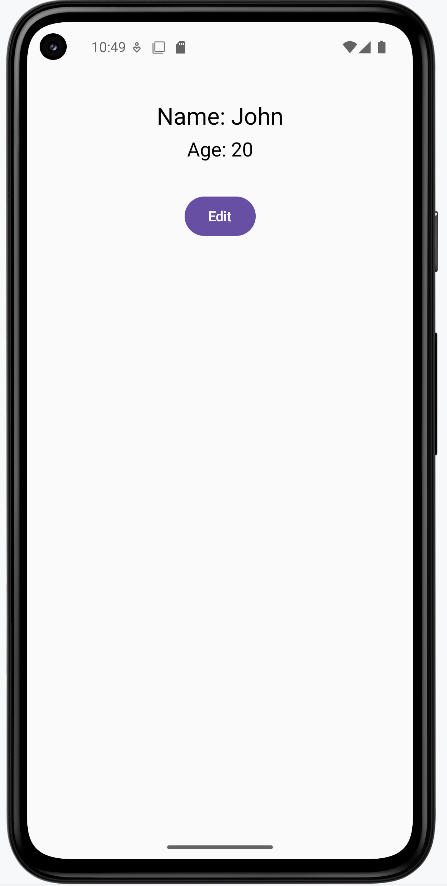
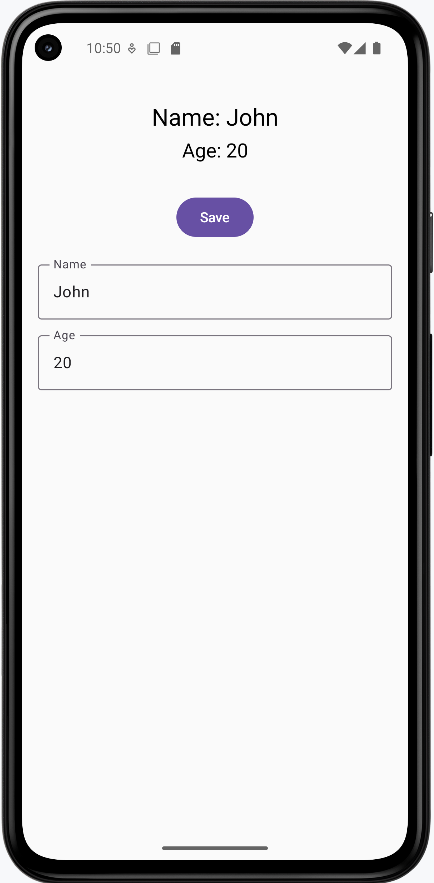
ProfileInfo is stateless: it takes name and age (as strings) and displays them in a column. It does not hold or change any state. EditableProfile is stateful: it keeps isEditing, name, and age in state. It shows ProfileInfo(name, age) at the top. The button toggles isEditing; when true, the label shows "Save" and the two text fields appear, bound directly to name and age. Typing in the fields updates state immediately, so the displayed profile and the form always show the same values. When the user clicks the button again, edit mode turns off and the fields hide. So the stateless ProfileInfo only displays what the stateful parent passes; the parent owns all state and the edit/view toggle.
Code Breakdown
Stateless Component (ProfileInfo)
The ProfileInfo composable is stateless because:
- It's like a simple display component that just shows what it's given
- It doesn't remember anything on its own
- It doesn't handle any user interactions
- It's completely controlled by its parent (it just displays the name and age it receives)
- Think of it like a picture frame - it just shows what you put in it
Stateful Component (EditableProfile)
The EditableProfile composable is stateful because:
- It manages its own memory (the state variables)
- It makes decisions based on its state (showing/hiding edit fields)
- It handles user interactions (button clicks, text input)
- It coordinates between different parts of the UI
- Think of it like a smart form - it remembers what you type and can change its appearance
The key point is that ProfileInfo is completely controlled by EditableProfile - it can't change anything on its own. However, EditableProfile is in control of its own behavior and can change based on user interactions. This example shows how you can build complex UIs by combining simple, stateless components (that just display things) with smart, stateful components (that handle user interactions and remember things).
How these examples render
The first image shows the stateless GreetingCard or the stateful Counter / EditableProfile in view mode (profile displayed, "Edit" button). The second image shows EditableProfile in edit mode: text fields for name and age and a "Save" button. The snippets above are only part of the code; to see and run the full project, go to my GitHub page and open the chapter6 stateful.kt file.
Learning Aids
Tips for Success
- Start with stateless composables when possible
- Keep state management at the top level
- Break complex composables into smaller, focused pieces
- Use meaningful names for your composables
Common Mistakes to Avoid
- Adding state when it's not needed
- Putting state in the wrong place
- Making composables too complex
- Forgetting to handle state updates properly
Best Practices
- Keep it Simple: Try to make most of your composables stateless
- State at the Top: Put stateful logic in the top-level composables
- Single Responsibility: Each composable should do one thing well
- Reusability: Design composables to be reusable when possible